Email Tips and Tricks
 We’ve all sent emails and then wish we could have taken them back. Sometimes, it’s just something minor and annoying like a typo, or sometimes you reread the email later and realize the tone isn’t quite what you intended.
Some people might not be aware that all emails that pass through a school server are subject to FOIA (Freedom on Information Act). Even personal emails can be retained and used against you if they go through the school’s network. Districts are also required to keep emails in an archive, so even emails from years ago could be retrieved. The Local 743 suggests not using the school’s email for personal (non-school related) communication. The Union keeps personal emails on file for union business, be sure to keep that information updated.
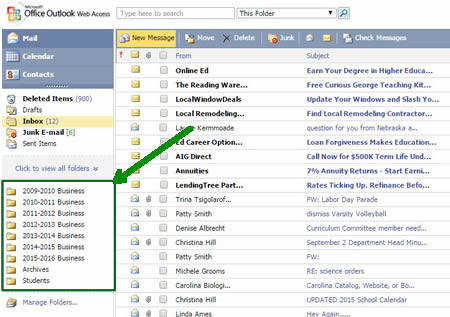
Another little known fact is that emails take up very little space and many people use Outlook as a way to store old emails that you might need to revisit. You can even search by subject and sender. I have made additional folders to store school related information by the year, so that I can attempt to keep my inbox area uncluttered. As you can see in the image below, I have separate folders for school years going back to 2009. I don’t store all emails there, just informative emails that relate to that school year (final exam schedule, educational development days, schedules, etc.)
Skyward has a built in system for communicating with teachers, but it can be easy to miss that tiny exclamation mark that indicates you have a message. If you have technical difficulties with skyward and that message icon, you can use the message center to send an email to all of your students that contains classroom information and your school email with a request to email directly instead of using skyward.
To avoid problems when communicating with parents, the Teaching Channel offers some practical advice. They provides sample emails that can help with responses to parents regarding classroom behavior, grades, and classroom practices . The responses are designed to help address concerns with parents and keep communication channels open. The best advice is to just slow down and not be in such a hurry to hit that send button.


